
Security is no longer optional; it’s a fundamental requirement for any business. From retail stores to corporate offices, CCTV surveillance systems play a critical role in protecting assets, monitoring activities, and deterring theft or misconduct. But with so many options available, how do you choose the right system for your specific needs?
In this blog, we’ll guide you through the essential factors to consider when selecting a CCTV system for your workspace. Whether you’re setting up surveillance for the first time or upgrading an outdated system, this article will help you make an informed decision.
1. Understand Your Surveillance Objectives
Before diving into camera types or technical specs, define what you want your CCTV system to accomplish:
- Prevent theft and shoplifting
- Monitor employee productivity
- Secure entry and exit points
- Track movement in storage or sensitive areas
- Record evidence for insurance or legal purposes
Your objectives will shape the kind of cameras, placement, and storage options you need.
2. Know the Different Types of CCTV Cameras
There is no one-size-fits-all solution. Here are the most common CCTV camera types used in offices and retail environments:
a) Dome Cameras
Ideal for indoor use. Their discreet design blends with interior decor, and they offer wide-angle coverage.
b) Bullet Cameras
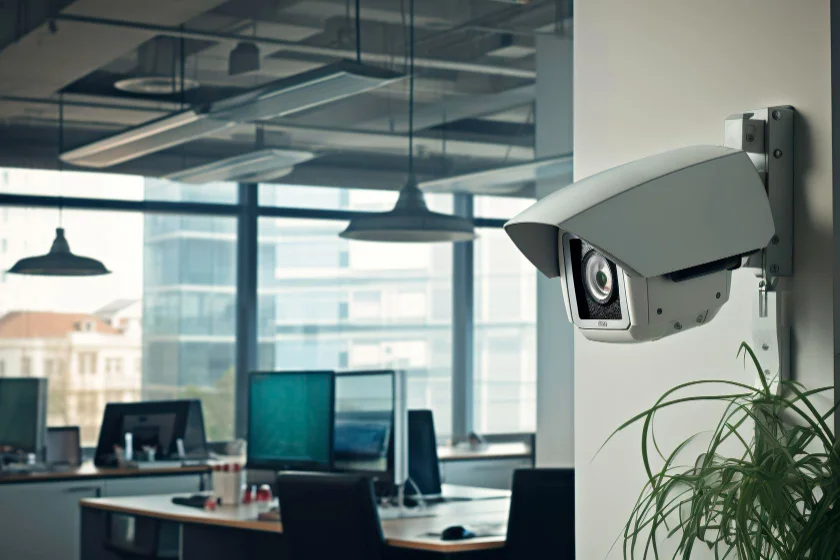
Great for outdoor use. Their shape and range make them suitable for long-distance monitoring in parking lots or exterior entryways.
c) PTZ Cameras (Pan-Tilt-Zoom)
These offer flexibility and control. You can remotely rotate and zoom to focus on specific areas, perfect for large spaces like warehouses.
d) IP Cameras
These digital cameras connect via network and offer high-resolution imaging, remote access, and cloud storage.
e) Thermal Cameras
Useful in low-light or dark environments. These cameras detect heat signatures and are often used in critical infrastructure or after-hours surveillance.
3. Assess Camera Resolution and Image Quality
The higher the resolution, the clearer the footage. For most offices and retail locations:
- 1080p (Full HD) is the minimum recommended resolution
- 4K (Ultra HD) is best for capturing fine details, like facial features or small items
Make sure the resolution matches your surveillance goals. For example, retail stores may need high-definition cameras near cash counters.
4. Consider Indoor vs Outdoor Requirements
Outdoor cameras need to be weatherproof and vandal-resistant. Look for IP ratings:
IP66 or IP67 indicates strong protection against dust and water.
For indoor spaces, ensure the camera design complements the environment without being intrusive.
5. Evaluate Lighting Conditions
Lighting greatly affects video clarity. Choose cameras with features like:
- Infrared (IR) Night Vision for low-light areas
- Wide Dynamic Range (WDR) for scenes with both bright and dark spots
- Low Lux Rating for better visibility in dim environments
6. Think About Storage and Video Management
CCTV footage needs to be recorded and stored securely. You have two main options:
- DVR (Digital Video Recorder): Works with analog cameras
- NVR (Network Video Recorder): Works with IP cameras
Consider:
- Number of days of footage you need to retain
- Storage capacity (in TB)
- Whether you want local or cloud-based storage
- Compression technologies like H.265 for efficient storage
7. Remote Access and Mobile Integration
Modern CCTV systems offer remote monitoring through smartphones, tablets, or desktops. This feature is critical for business owners and managers who need real-time access.
Ensure the system you choose has:
- A secure, user-friendly app
- Real-time alerts and notifications
- Multi-user access with role-based controls
8. Integration with Other Security Systems
A good CCTV setup can work in tandem with:
- Access control systems (e.g., fingerprint or card entry)
- Alarm systems
- Fire safety alerts
Integrated systems allow centralized monitoring and faster response times during emergencies.
9. Scalability and Future Expansion
Choose a system that can grow with your business. Modular CCTV setups let you add more cameras or upgrade features without replacing the entire system.
If you’re planning to expand to multiple locations, consider cloud-managed or centralized systems.
10. Work with a Professional Installer
A professionally installed system ensures optimal camera placement, cable management, and system configuration. Aqua Computers and Services provides end-to-end CCTV solutions, including:
- Site assessment and consultation
- System design
- Installation and cabling
- Testing and training
- Ongoing support and AMC (Annual Maintenance Contracts)
11. Compliance and Privacy Considerations
Ensure your surveillance system complies with local laws regarding data storage and video monitoring. Inform employees and visitors about surveillance, and avoid monitoring private areas like restrooms.
Conclusion
Choosing the right CCTV surveillance system is an investment in the safety, efficiency, and accountability of your business. It requires a thoughtful assessment of your space, risks, and objectives.
With years of experience and a commitment to tailored IT solutions, Aqua Computers and Services helps businesses design and implement the ideal CCTV setup. Whether it’s a single retail outlet or a multi-floor corporate office, we ensure your security infrastructure is future-ready.
Ready to enhance your security? Contact Aqua for a customized CCTV consultation today.